Bring your PDS Backup to us to Host!
We need a Backup of your PDS. Downloading off Blusky will not contain all your data.
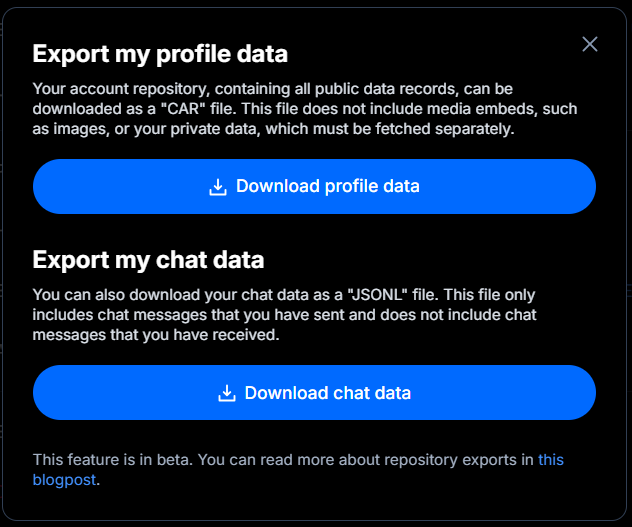
You can only get your profile data from Blusky! https://docs.bsky.app/blog/repo-export
Replace <YOURDID> with your DID!
mkdir -p ~/pds-export/blobs && cd ~/pds-export
curl -sL "http://127.0.0.1:3000/xrpc/com.atproto.sync.getRepo?did=did:<YOURDID>" -o repo.car
for cid in $(curl -s "http://127.0.0.1:3000/xrpc/com.atproto.sync.listBlobs?did=did:plc:<YOURDID>&limit=1000" | grep -oE 'baf[a-z0-9]+'); do curl -sL "http://127.0.0.1:3000/xrpc/com.atproto.sync.getBlob?did=did:plc:<YOURDID>&cid=$cid" -o "blobs/$cid"; done
grep "PDS_PLC_ROTATION_KEY_K256_PRIVATE_KEY_HEX" /pds/pds.env > plc-rotation-key.txt
cp -r /pds/actors ~/pds-export/ 2>/dev/null || true
cp /pds/account.sqlite ~/pds-export/ 2>/dev/null || true
cd ~ && tar -czvf ~/handle-export.tar.gz pds-export
Now, with this tar.gz, anyone you give it too has your entire account in their hands. They have the ability to move your handle from one PDS to another!
• Posts, Replies, Likes & Reposts
• repo.car: ✅ Yes
• blobs/ folder: ❌ No
• Full /pds Backup: ✅ Yes (inside store.sqlite)
• Follows, Blocks, Lists & Profile Bio
• repo.car: ✅ Yes
• blobs/ folder: ❌ No
• Full /pds Backup: ✅ Yes (inside store.sqlite)
• Your Followers (People who follow you)
• Where it lives: 🌐 Stored globally on the Bluesky network — tied directly to your did:plc identity, so you never lose followers when moving servers.
• Images, Videos, Avatar & Banner
• repo.car: 🔗 Only contains the cryptographic file links (CIDs), not the actual images
• blobs/ folder: ✅ Yes (contains the raw image/video files)
• Full /pds Backup: ✅ Yes (inside blocks/)
• Private App Settings (Pinned Feeds, Muted Words)
• repo.car: ❌ No (public data only)
• blobs/ folder: ❌ No
• Full /pds Backup: ✅ Yes (inside store.sqlite -> account_pref)
• PLC Identity Master Key (Required to move servers if DNS is dead)
• repo.car: ❌ No
• blobs/ folder: ❌ No
• Full /pds Backup: ✅ Yes (inside /pds/pds.env as PDS_PLC_ROTATION_KEY_K256_PRIVATE_KEY_HEX)
So, that's a breakdown of what's inside your backup. Once you have your backup... You can move it to any other PDS Server.
We would then do...
1. Create the Migration Target Account on pds-core (http://127.0.0.1:3025):
• Generate an invite code in account.sqlite and a Service Auth JWT signed by his key for did:<YOURDID>.
• Call POST /xrpc/com.atproto.server.createAccount on pds-core passing his existing did (did:plc:<YOURDID>) and handle at.sqds.com.
• When an existing did is passed to createAccount, @atproto/pds creates the account in a deactivated migration state ready to receive his data.
2. Import Your Repository (repo.car) & Media (blobs/*):
• Call POST /xrpc/com.atproto.repo.importRepo on pds-core with your repo.car file (restores all posts, follows, likes, blocks, lists, and profile).
• Loop through his blobs/ folder and upload each media file via POST /xrpc/com.atproto.repo.uploadBlob.
3. Repoint Your DID in plc.directory from old.pds.com to sqpds.com:
• Call GET /xrpc/com.atproto.identity.getRecommendedDidCredentials on pds-core to get the new repo signing key generated for you on sqpds.com.
• Sign a PLC update operation using your PDS_PLC_ROTATION_KEY_K256_PRIVATE_KEY_HEX (from plc-rotation-key.txt) and POST it to https://plc.directory/did:plc:<YOURDID>.
• This updates his official PLC record so:
• serviceEndpoint changes from https://old.pds.com ➔ https://sqpds.com
• alsoKnownAs changes from at://old.pds.com ➔ at://at.sqpds.com
• verificationMethod (#atproto) updates to sqpds.com's signing key.
4. Activate Your Account on pds-core:
• Call POST /xrpc/com.atproto.server.activateAccount on pds-core.
• pds-core verifies that plc.directory and at.sqpds.com now point to sqpds.com, marks your account active, and emits an #identity and #account event to the Bluesky firehose so bsky.app immediately recognizes https://sqpds.com as your new PDS.
5. Upgrade Your Account in the Dashboard and enjoy our PDS Hosting! You get 30 days free for us to migrate your data and make sure everything is OK and Happy. Then you pay for the Monthly or Yearly!
If you're brand new to us host your PDS Data, you don't need to do any of this! Just sign up to PDS and it's all setup and running immediately!